
MANAGE YOUR Y ACCOUNT ONLINE!
Easily access your Newton YMCA childcare account online! View your balance, make a payment, view your payment history and print receipts!
Easily access your Newton YMCA childcare account online! View your balance, make a payment, view your payment history and print receipts!
Questions about your online account? Call the Y at 641-792-4006, stop by the Welcome Center or Email Mary at mary.sales@newtonymca.org
|
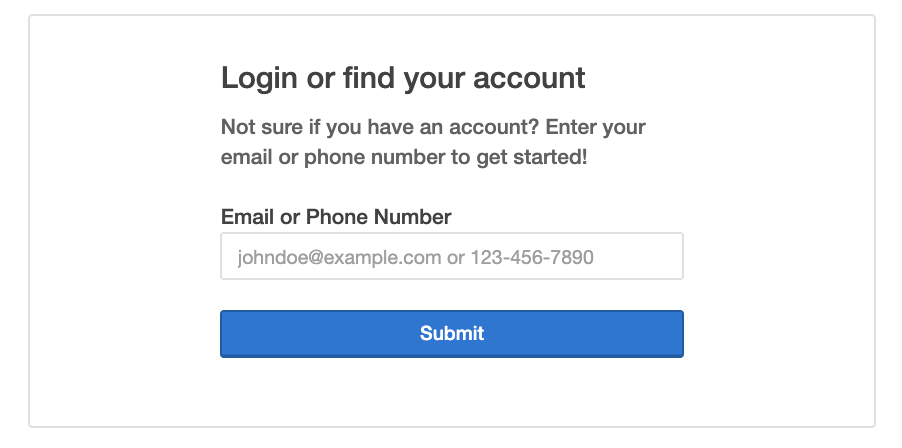
• Click here to access your account • Enter the phone number and email address associated with your YMCA account record and click submit to find your account |
|
|
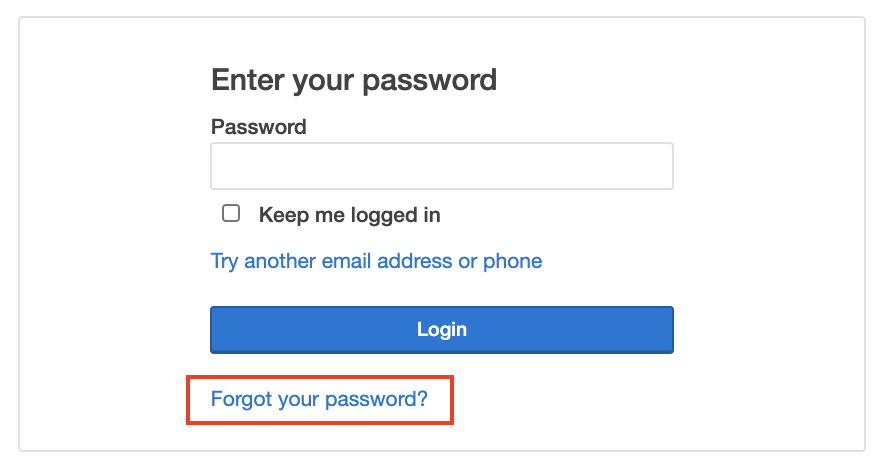
• Click "Forgot Password" |
|
|
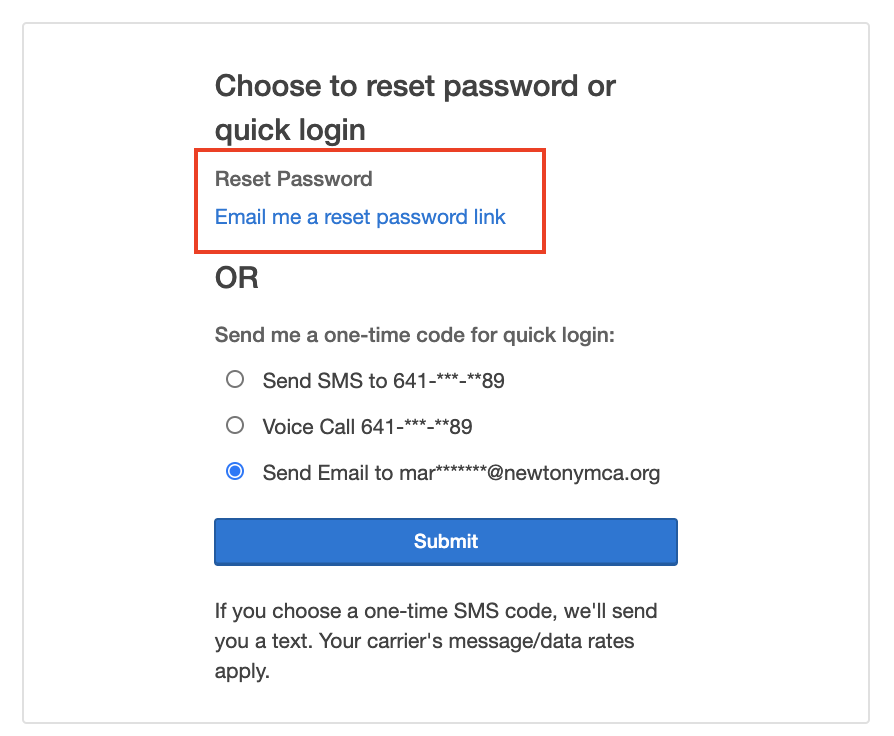
• Click “Email me a reset password link • You will be receiving an email from the Newton YMCA. Be sure to check your junk folder. • Click the link in the email to reset your password. |
|
FREQUENTLY ASKED QUESTIONS
Q: How do I schedule my child care payments?
• Click on "My Balance"
• Check the boxes next to "Description" and the top line – with your program info in it, to choose all weeks
• Once all are checked – scroll to the bottom.
• Click "Schedule a payment"
• Scroll to the bottom again – click "Continue"
• Follow the prompts – select payment method or add a new one
• Leave "Pay on Due Dates" then click "Create Schedules"
Q: How do I get a receipt?
• Log on to your Account Click on "Payment History"
• Select the drop down list for the date range needed
• Click the arrow next to each payment method to see the details of the fees
• Click the printer icon to view a "Printer Friendly" receipt option
Q: How do I change my password?
• Click on the edit pencil next to your email address on the main screen after login
• Enter your current password
• Enter your new password
• Confirm your new password
• Click Update
Q: How do I print my child care tax statement?
• Click on 202X Year-end child care statement
• Tax Statement will include all tax deductible child care programs and camp
• Tax Statements are generated in January for the previous calendar year
Q: How do I update my account and/or credit card information?
To update your credit card:
• Go to "Billing Methods" section
• Select each billing method to edit the information
• Update as needed & click "Submit"
• Select the red icon next to each billing method if you would like to completely remove the credit card or bank draft from your record. Please note: you cannot delete a draft method that is currently being used for membership, scheduled program payments, or scheduled pledge payments.
To add a new credit card or EFT to your account:
• Go to "Payment Management" section Click "Add Credit Card" or "Add Bank Draft"
• Enter the billing method information Click ‘Submit’ To update the billing method associated with your membership:
• Select the "Edit" pencil next to the billing method within "Account Summary" section
• Select new billing method from the drop down list & click "Submit"
• If you do not see the your preferred billing method, go to the "Payment Management" section and add a new billing method To update a scheduled payment for a program:
• Click on "My Balance"
• Select "Cancel" or "Reschedule" next to each scheduled payment
• Enter a new date or select correct billing method & click "Update Schedule"
Q: How do I schedule my child care payments?
• Click on "My Balance"
• Check the boxes next to "Description" and the top line – with your program info in it, to choose all weeks
• Once all are checked – scroll to the bottom.
• Click "Schedule a payment"
• Scroll to the bottom again – click "Continue"
• Follow the prompts – select payment method or add a new one
• Leave "Pay on Due Dates" then click "Create Schedules"
Q: How do I get a receipt?
• Log on to your Account Click on "Payment History"
• Select the drop down list for the date range needed
• Click the arrow next to each payment method to see the details of the fees
• Click the printer icon to view a "Printer Friendly" receipt option
Q: How do I change my password?
• Click on the edit pencil next to your email address on the main screen after login
• Enter your current password
• Enter your new password
• Confirm your new password
• Click Update
Q: How do I print my child care tax statement?
• Click on 202X Year-end child care statement
• Tax Statement will include all tax deductible child care programs and camp
• Tax Statements are generated in January for the previous calendar year
Q: How do I update my account and/or credit card information?
To update your credit card:
• Go to "Billing Methods" section
• Select each billing method to edit the information
• Update as needed & click "Submit"
• Select the red icon next to each billing method if you would like to completely remove the credit card or bank draft from your record. Please note: you cannot delete a draft method that is currently being used for membership, scheduled program payments, or scheduled pledge payments.
To add a new credit card or EFT to your account:
• Go to "Payment Management" section Click "Add Credit Card" or "Add Bank Draft"
• Enter the billing method information Click ‘Submit’ To update the billing method associated with your membership:
• Select the "Edit" pencil next to the billing method within "Account Summary" section
• Select new billing method from the drop down list & click "Submit"
• If you do not see the your preferred billing method, go to the "Payment Management" section and add a new billing method To update a scheduled payment for a program:
• Click on "My Balance"
• Select "Cancel" or "Reschedule" next to each scheduled payment
• Enter a new date or select correct billing method & click "Update Schedule"
Questions about your online account? Call the Y at 641-792-4006, stop by the Welcome Center or Email Deb at Deb.Greif@newtonymca.org